
4 min read
Simplified HTTP Requests (and Tests) with Hurl
A practical look at Hurl: HTTP requests, assertions, variables, HTML reports, and running API tests locally and in GitHub Actions.
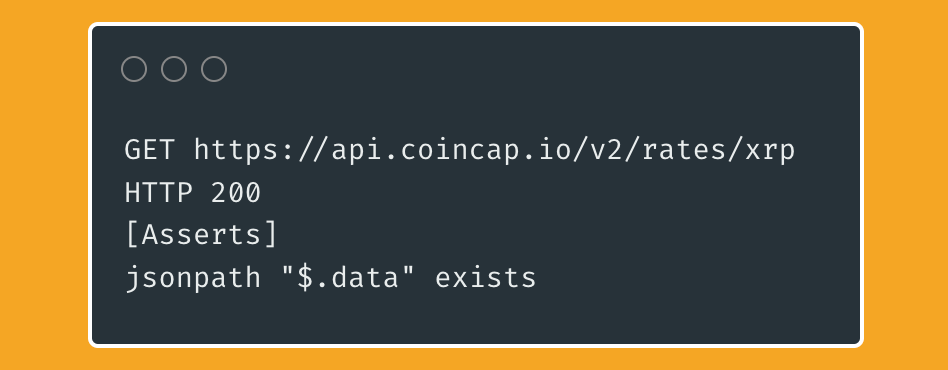
A simple request with assertion for 200 status code and json property check.
Introduction
Lately, I’ve been experimenting with Hurl, a tool I came across while looking for a low-effort approach to smoke and sanity testing. I usually use the RestAssured/TestNG stack to create api testing projects, which, by the way, are more than sufficient. However, I decided to explore alternatives. My reasoning was (and please don’t judge) that our smoke-level test suites required significantly fewer requests compared to acceptance or regression tests. Additionally, performance was a bigger concern since all tests would run in the production environment. After some digging, I found the Hurl documentation and did some further exploration.
TL;DR: Wanna check out a cool http cli tool? Refer to docs and example project.
What is Hurl?
Hurl is a lightweight cli tool with various functionalities such as chained requests, response assertions, storing response attributes and reporting. It uses its own file type (.hurl) to define test suites. You can define and run multiple files or specify which ones to run.
Hurl is built on top of curl library and extended it’s abilities to fit test automation related needs. I found the execution time fairly fast and simple enough to be suitable for most cases. However, it might be limiting if you are thinking about to do api testing only using Hurl.
Is it only suitable for test automation? No. Do you use curl only for testing?
Can I use it on automation projects with multiple requests and assertions? Absolutely.
Can I fulfill all my test automation related tasks with Hurl? Probably not, depends on your scope.
HTTP Requests & Assertions
I’ve created an example project to better explain functionalities hurl has. It sends requests to Coincap API for crypto market data. The “/v2/assets” endpoint returns a long list of assets. The exact list is too large to put here but the structure is similar to following:
{
  "data": [
    {
      "id": "bitcoin",
      "rank": "1",
      "symbol": "BTC",
      "name": "Bitcoin",
      "supply": "17193925.0000000000000000",
      "maxSupply": "21000000.0000000000000000",
      "marketCapUsd": "119150835874.4699281625807300",
      "volumeUsd24Hr": "2927959461.1750323310959460",
      "priceUsd": "6929.8217756835584756",
      "changePercent24Hr": "-0.8101417214350335",
      "vwap24Hr": "7175.0663247679233209"
    },
    {
      "id": "ethereum",
      "rank": "2",
      "symbol": "ETH",
      "name": "Ethereum",
      "supply": "101160540.0000000000000000",
      "maxSupply": null,
      "marketCapUsd": "40967739219.6612727047843840",
      "volumeUsd24Hr": "1026669440.6451482672850841",
      "priceUsd": "404.9774667045200896",
      "changePercent24Hr": "-0.0999626159535347",
      "vwap24Hr": "415.3288028454417241"
    }
  ]
}
As I’ve mentioned before, Hurl uses its own file type. They contain blocks of request and response details (if any) that are read and executed from top to bottom. There are no additional runtime required, it’s basically a single binary.
GET {{host}}/v2/assets #First line of every requestRequests are required to start with the type of HTTP method, followed by the URL. The URL is passed as a variable from a <.env> file. There are no semicolon or indention like syntax in hurl cases. However, order of lines are important as it follows a similar given-when-then-ish pattern. For example, you can not call [Asserts] without finishing the upper request details block.
The first line is enough for Hurl to make the request. However, we can specify rest of the details such as request body, query parameters, options, form parameters etc. There are not many request parameters in our example but you can always refer to docs.
HTTP 200 #Status code assertionStatus code assertions are sepereated from rest of the assertions we will discuss shortly. They are defined by the simple: “HTTP + StatusCode” format.
[Asserts] #Rest of the assertions
header "Content-Type" == "application/json; charset=utf-8"
header "date" exists
header "server" == "cloudflare"
duration < 1000
jsonpath "$.data" isCollection
jsonpath "$.data" count > 20
Any assertions excluding http and status code are defined under [Asserts] block. You can assert headers, urls, cookies, response bodies etc. Hurl also takes advantage of Predicates that allows us to assert in various conditions. While Content-Type is asserted to the exact match, header date is just checked if it exists or not.
Notice how the “duration” key is used? It captures the response time of the request in milliseconds. In the example, I wanted to ensure that the response time was below 1000ms.
Another important keyword is “jsonpath”, which can be used to navigate JSON responses. The /v2/assets endpoint returns a long list of assets under the key “data”. As you can guess, the assertion checks for the size and if the property is a collection.
Variables
We can also make use of variables that can be defined per test run. One way to define variables is capturing from responses:
[Captures]
capturedVariable : jsonpath "$.data[0].id"
Another way is to define static variables from .env files. In this example, vars.env file is used:
# Host
host=https://api.coincap.io
# Request Parameters
rates_id=bitcoin
Once a variable is captured or defined, simply call them in any part of syntax:
GET {{host}}/v2/assets
[QueryStringParams]
search: {{capturedVariable}}
limit: 2
HTTP 200
[Asserts]
header "Content-Type" == "application/json; charset=utf-8"
header "date" exists
header "server" == "cloudflare"
duration < 1000
jsonpath "$.data" isCollection
jsonpath "$.data" count == 2
In this request, capturedVariable is given as the value of the query parameter “search”.
Running Tests Locally
In its simplest form, Hurl can be run by simply executing:
hurl --test test.hurlIn this project, we need to use the --variable-file and --report-html flags to refer to our vars.env file and generate an HTML report of the results, respectively. So it should be something similar to:
hurl --variables-file .\vars.env --test .\tests --report-html ./reports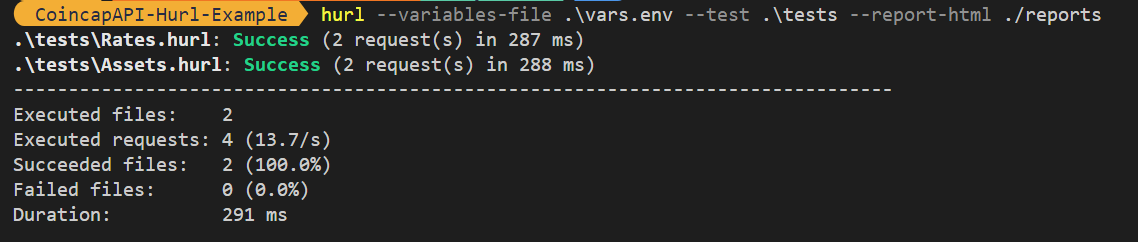
You can also add --very-verbose for detailed logs
Running Tests Using Github Actions
I’m sure there are alternatives to this but I’ve used a simple dockerfile to build and run tests. I’ve also added html report as an artifact for inspection.
Dockerfile:
FROM ghcr.io/orange-opensource/hurl:6.0.0
WORKDIR /tests
COPY . .
ENTRYPOINT [ "hurl", "--variables-file", "./vars.env", "--test", "/tests", "--report-html", "./reports" ]
YML:
name: Hurl Tests

on: [push, pull_request]

jobs:
  test:
    name: Run Tests
    runs-on: ubuntu-latest

    steps:
      - name: Checkout Repository
        uses: actions/checkout@v4

      - name: Install Hurl
        run: docker build -t my-hurl-runner .

      - name: Run Hurl Tests Inside Docker
        run: docker run --rm -v $(pwd):/tests my-hurl-runner

      - name: Upload HTML Report
        uses: actions/upload-artifact@v4
        with:
          name: hurl-html-report
          path: reports
          retention-days: 7
if you want a fancier version, you can also deploy the generated html to github pages.
Conclusion
In my opinion, Hurl is definitely worth checking out. I like that its a single binary and requires almost zero effort to run. Also it contains great amount of features that can be useful for most projects. I’m not sure if it can replace the automation framework you already use but it can surely be more than complementary to your test efforts.
Originally published on Medium.
Found a typo or have a thought?Find me on GitHub.